








 English Vocabulary from
Showing posts with label Computers Basics. Show all posts
Showing posts with label Computers Basics. Show all posts
January 06, 2015
Data Accepting Systm in Computers
September 19, 2014
Quiz on Computer Knowledge
- Using output devices, one can ____________
- Input Data
- Store Data
- Scan Data
- View or Print Data
- Send data
- Why is the Caps Lock key referred to as toggle key ?
- Because it's function goes back and forth every time it is pressed
- Because it cannot be used for entering numbers
- Because it cannot be used to delete
- Because it cannot be used to insert
- Because it cannot be used to view
August 18, 2013
Why are the Keys in a computer keyboard not arranged in Alphabetical order?
April 16, 2013
Computer Basics Pdf
Download basic of computer pdf from here

October 13, 2012
Computer Fundamentals in Hindi Language - Pdf Download
June 25, 2012
Computer Abbreviations - Part 1
February 16, 2012
The Keyboard
The KeyBoard
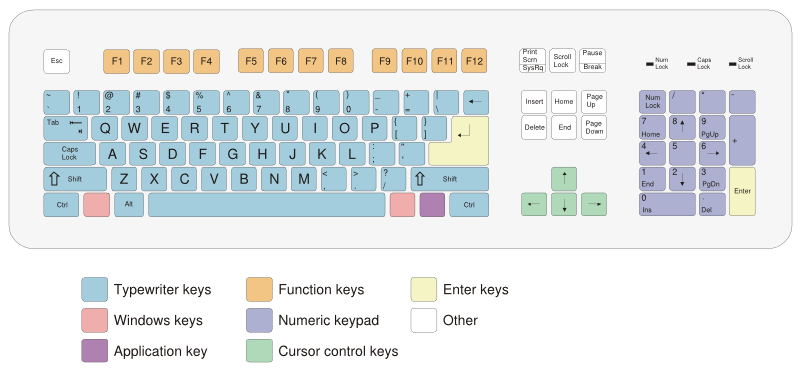
There are various types of keys are there in Keyboard.Namely,
- Typewriter Keys
- FunctionKeys
- Enter Keys
- Windows Keys
- Number Keys / Numeric keys
- Application Keys
- Cursor Control Key
Have a look at the Below image to get a detailed View
 |
| Click on the image to get a Detailed View |
☞ Back to the Computers Basics
Computers Basics
 When he turned on the switch, it said YES, he marked it as 1
When he turned off the switch, it said NO, he marked it as 0
He became famous with this YES/NO Device. He added some circuits to it, so that it could perform some calculations. So he called it as Calculator. In-order to make his Ironbox remember calculations, he added some memory to it. And named it as Computer.
He added some Input Devices (Keyboard, Mouse, Scanner, Touch pad, Light-pen, Joystick) to it so that he can talk to it.
He added some Output Devices (Monitor, Speaker, Printer) to it so that the Ironbox can talk to him.
He felt happy because he developed a semi brain called Computer. So, he wanted to communicate with it.
He said "Hi"
It said "1011"
He said "How are you?"
It said "0110 1010 0101"
Then he realized that his Computer only can understand 1's and 0's. So he tried to talk in 1's and 0's language. Later he realized that its really hard to do that. So he attached a compiler to his Computer. The compiler converts his words into 1's and 0's and gives to the computer. And later converts the computer's response into our sooper hero's language.
Our hero felt that he almost Did it. But even our Compiler also cant understand our sooper Hero's language. So he developed some languages (C, C++, Java etc) to talk to the compiler.
So our sooper hero finally managed to build a Computer and Proved that hez a Brainless Brilliant.
How does Computer Work ?
The Keyboard


